
Staging & cameras
Intermediate Last updated Jul 10, 2026
On this page
Without any staging, Questwright simply places every speaker facing their interlocutor and frames the scene automatically; many quests never need more. Staging is for multi-NPC blocking, spawned extras, mid-dialogue movement and hand-placed cameras.
The staging canvas
The Studio’s right zone is a top-down canvas of the scene around its anchor (a placed dialogue marker, or the giver’s own transform if you don’t place one). Drag marks to position characters, rotate them, add waypoints, and place cameras. Put the cursor in a dialogue line and the canvas highlights who stands where at that moment: occupancy is tracked line-by-line across the whole scene.
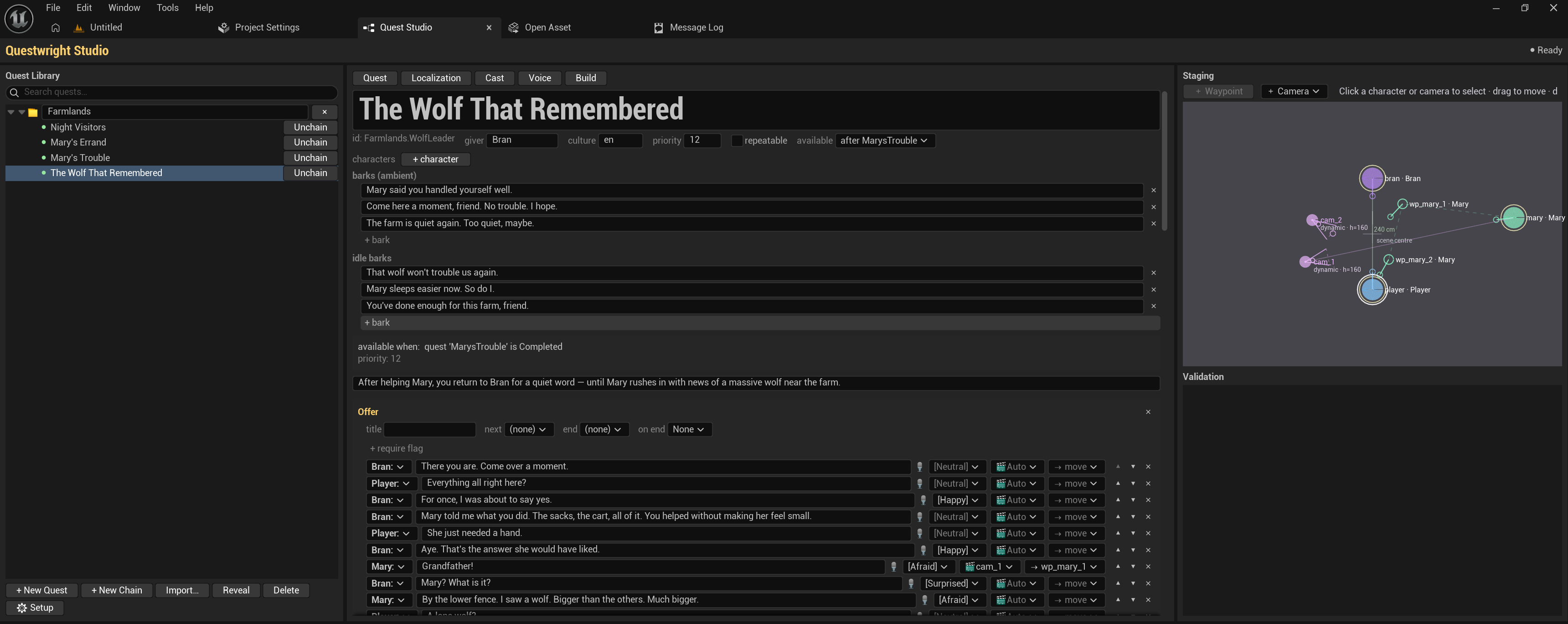
Everything the canvas edits is written to the quest file’s staging: block. As with the rest
of the Studio, hand-authoring is equivalent:
staging:
  anchor: DialogueMarker_Barn   # a placed BP_QW_DialogueMarker; omit → the giver's transform
  settle_timeout: 4.0           # seconds a walk may take before falling back to teleport
  marks:
    - { id: giver, actor: Bran,   pos: [-100, -30], face: hero, keep: true }
    - { id: hero,  actor: Player, pos: [-100,  60], face: giver }
    - { id: m1,    actor: Mira,   pos: [ 140,  30], face: anchor, appear: arrive }
    - { id: m2,    actor: Mira,   pos: [  40, -80], face: anchor }   # waypoint
Key mark fields:
| Field | Purpose |
|---|---|
id | Stable id; line.stage.to and cameras reference marks by id |
actor | Speaker key; omit for a pure waypoint |
pos | [x, y] in cm, anchor-relative; height is ground-snapped at runtime |
face / yaw | Auto-turn toward the anchor / a speaker / a mark, or a manual angle |
appear | placed (standing there at scene start) or arrive (spawns out of view and walks in; its first line waits for arrival) |
keep | Whether a spawned participant stays after the dialogue ends (default: despawn) |
Participants already in the level (and the Player) are moved; everyone else is spawned from the cast and cleaned up automatically.
Mid-dialogue movement
Attach a stage: transition to any line; the line waits for the move to finish (with a
teleport fallback after settle_timeout):
- { by: Mira, id: step, text: "Let me see the tracks.",
    stage: [ { who: Mira, to: m2, approach: walk } ] }
One mark holds one participant at a time: the validator flags two people on the same mark at the same moment as an error, and the canvas shows the conflict.
Automatic cameras
By default the compiler frames every scene with a shot grammar: an establishing wide on the
first line, close-ups after consecutive lines from one speaker, over-the-shoulder framing
driven by each line’s to: addressee. Per-line overrides use shot: (wide, ots, cu,
reaction), and the per-quest policy is tunable:
camera:
  cu_run_threshold: 2     # close-up after N consecutive lines from one speaker (default 3)
  establishing: true      # establishing wide on the first line (default true)
  choice_shot: wide       # shot while the player is choosing (default wide)
Custom camera marks
For full directorial control, place cameras on the canvas; each gets a live frustum preview so you see exactly what it frames:
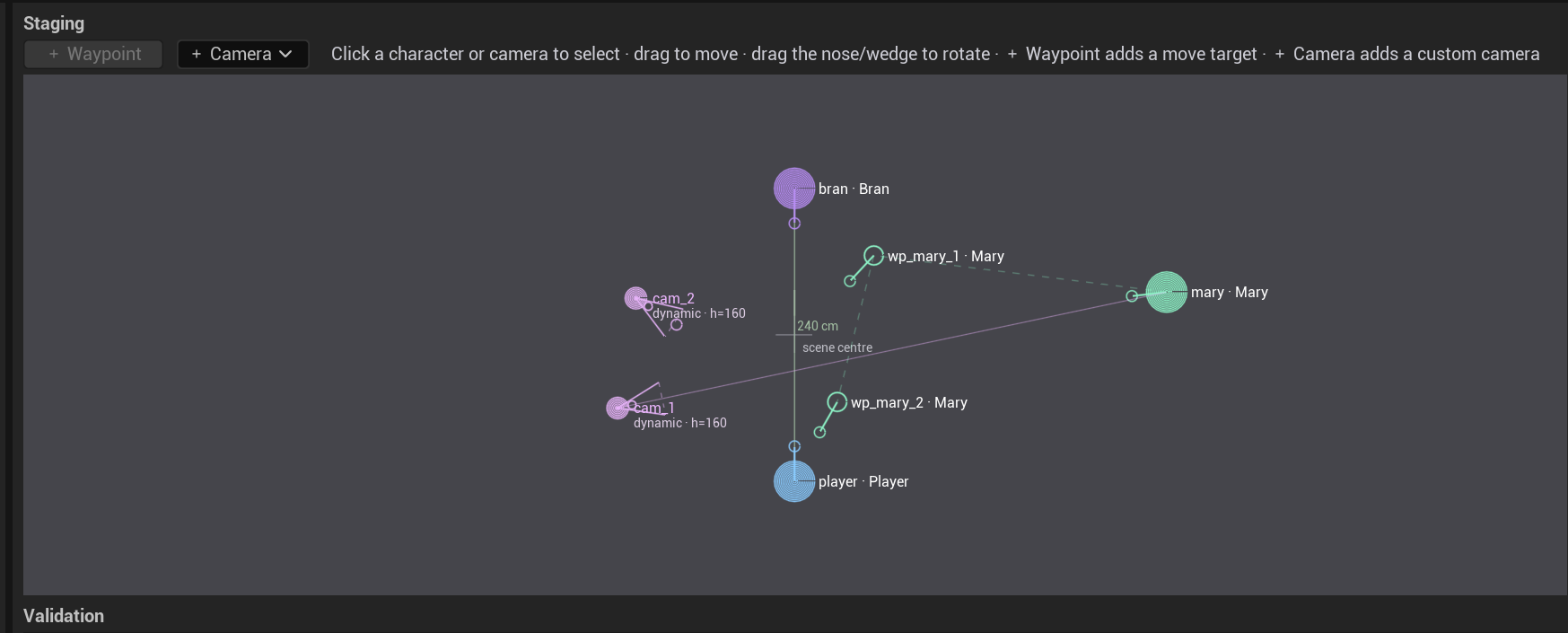
staging:
  cameras:
    - { id: cam_quick,  class: dynamic,         pos: [200, 0],    height: 200, look_at: anchor }
    - { id: cam_window, class: BP_MyCam_Voyeur, pos: [-320, 90],  height: 150, look_at: giver, fov: 28 }
    - { id: cam_dutch,  class: BP_MyCam_Dutch,  pos: [140, 200],  height: 120, yaw: -135, pitch: -8 }

# on a line:            shot: cam_window
# while choices unfold: camera: { choice_shot: cam_high }
How it fits together:
- The mark is an instance: a stable id, an anchor-relative position and an aim. Lines
reference the mark id via
shot:, never a class or coordinates. - The reusable optics (lens / DOF / filmback) live in a camera class, meaning any Blueprint
subclass of
QuestwrightDialogueSceneCamera. The built-inclass: dynamicneeds no Blueprint at all (default optics, combine withfov:for a quick custom angle). look_ataims at the anchor, a speaker or a mark, resolved at the moment of the cut, so a camera keeps its subject framed even after mid-dialogue moves.- The auto grammar never picks custom marks; they are explicit per-line (or
choice_shot) overrides only. - If a camera class fails to load at runtime, the line degrades to a wide fallback with a warning; the scene never breaks.
Design notes
Cameras cut instantly (SetViewTargetWithBlend with zero blend) and characters move with the
engine’s own AI locomotion. There is no Sequencer and no baked cinematics, which is why scenes
keep working when your level, characters or animations change. All references go to stable ids
(marks, lines, quests), never to coordinates or class internals.